
Imagine pulling up to your home with groceries in hand. Your August smart lock senses you and unlocks the door. No fumbling for keys. Geofencing makes this possible. It creates a virtual boundary around your house using your phone’s location. The lock reacts when you enter or leave that area.
Smart home devices like the August smart lock boost convenience. Users report high satisfaction with auto features. A study from Cornell University highlights how location-based rules improve daily routines. Geofencing ties into this by automating access.
What Is Geofencing and Why Use It with August Smart Locks?
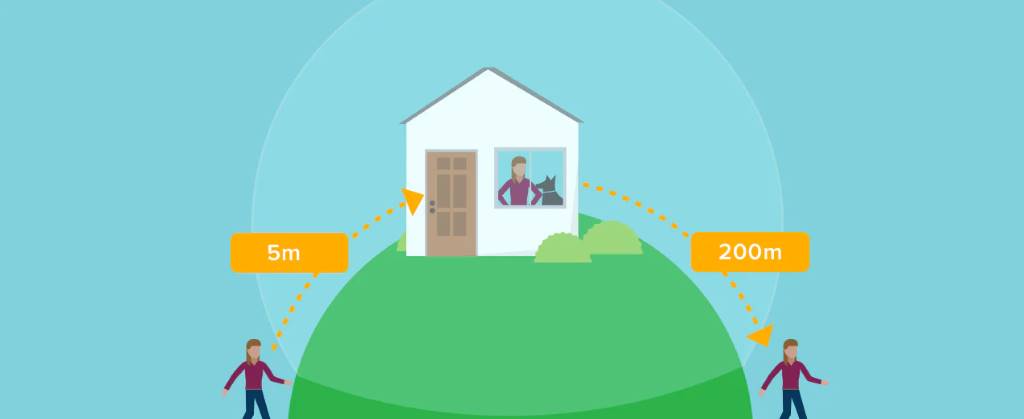
Geofencing draws a digital fence on a map. Your phone detects when you cross it. For the August smart lock, this triggers auto unlock as you approach home. It switches to away mode when you leave, ready for auto lock.
This feature saves time. You avoid manual unlocking. It adds security too. The lock stays secure until you near the door. Pair it with DoorSense™ technology. That checks if the door closes properly.
August Wi-Fi Smart Lock handles this well. It uses Bluetooth Low Energy for close detection. GPS accuracy plays a role in setting the boundary. Benefits include hands-free entry. Think of busy parents or delivery pros. They gain peace of mind.
Research indicates that geofencing technology significantly reduces the likelihood of forgetful locks. This innovation allows homeowners to rest easy, knowing they are less likely to leave doors open unintentionally. By utilizing GPS and Bluetooth connectivity, geofencing seamlessly integrates with various smart home systems. This integration enhances the functionality of voice assistants, such as Google Assistant, enabling them to respond more quickly and efficiently to user commands. If you’re looking for cost-effective solutions to enhance your kitchen, explore Affordable Kitchen Appliance Solutions tailored for every budget.
Requirements for Setting Up Geofence on August Smart Lock
Start with compatible hardware. You need an August smart door lock. Models like the August Wi-Fi Smart Lock work best. For remote features, add the August Connect Wi-Fi bridge. It links the lock to your network.
Your phone matters. iOS or Android devices support the August app. Enable location services always. Bluetooth must stay on. Wi-Fi helps for signal strength.
Check your deadbolt. It should be a single-cylinder deadbolt. The lock attaches inside without changing keys. Physical house keys still work as backup.
App version counts. Update to the latest. This fixes bugs in auto unlock setup. Battery life in the lock lasts months with proper use.
For multiple users, each phone sets its own geofence. Share access via the app. Guests get temporary codes.
Step-by-Step Guide to Set Up Geofence
Download the August app first. Create an account if new. Pair your lock during initial setup.
Install the August Smart Lock
Screw the lock onto your existing deadbolt. Use the app for guidance. It takes minutes. No wiring needed for Bluetooth models.
Add the August Connect if you have it. Plug it near the door. Connect to Wi-Fi. This enables remote access.
Enable Location Services and Permissions
Go to phone settings. Allow the app full location access. Turn on Bluetooth. For iOS, enable precise location. Android needs background location.
In the app, grant permissions. This covers app permissions for smooth operation.
Access Auto-Unlock Settings
Open the app. Tap your lock. Go to lock settings. Find automation or Auto-Unlock by Distance.
Toggle it on. The app uses your current spot to set home as center.
Set the Geofence Boundary
The app draws the perimeter. It defaults to a safe size. Adjust if needed, but keep it wide for accuracy. Small fences cause false triggers.
Confirm with Google Maps or Apple Maps integration. Local cell tower data helps pinpoint.
Save changes. Test by walking away and back.
Configure Auto-Lock Features
Set Auto-Lock by Duration. Choose 30 seconds to 30 minutes. Use DoorSense™ for instant lock when door closes.
Link to away mode. When you leave the geofence, it arms.
Integrating with Smart Home Systems
August smart locks play nice with others. Connect to Apple HomeKit for Siri control. Say “Hey Siri, unlock the door.”
For Google Assistant, use voice commands. “Hey Google, lock the front door.” Amazon Alexa works too.
Z-Wave technology adds hub support. Smart home systems grow with these.
Apple Watch unlocks via Bluetooth. Wearables make it seamless.
Troubleshooting Common Geofence Issues
Auto unlock fails sometimes. Check GPS accuracy first. Update your operating system.
Wi-Fi signal strength matters. Use the August Connect for better reach. Troubleshoot Wi-Fi bridge connection.
If location services glitch, restart the app. Clear cache.
For multiple phones, each needs setup. Away mode waits 200 meters out.
Battery life drops with constant location use. Turn on power saving features.
Firmware updates fix bugs. Check in app settings.
Activity feed shows logs. Review for patterns.
Tips for Optimal Performance
Keep the app updated. This improves auto unlock feature.
Test in real scenarios. Walk paths to home.
Use Home Mode inside. It disables unnecessary unlocks.
Combine with smart alerts. Get notifications on status.
For smart phones, enable always-on location.
Avoid tight geofences. They confuse the system.
Monitor signal levels. Place bridge near power outlet.
Advanced Features and Customizations
Set location-based rules. Auto unlock only at night.
Integrate with smart features. Lights turn on as you arrive.
Ultimate control comes from the app. Schedule modes.
Use with Yale Keypad for codes.
Explore Weiser App if compatible, but stick to August for core.
Conclusion
Geofence setup transforms your August smart lock. You gain auto unlock and peace. Follow steps for quick install. Troubleshoot as needed. Enjoy hands-free home access.
Try it today. Open the app and enable Auto-Unlock by Distance.
FAQs
What if Auto-Unlock by Distance does not trigger?
Check location services. Update the app. Ensure you left the geofence first.
Do I need August Connect for geofence?
No for basic auto unlock. Yes for remote access and voice integration.
How does GPS accuracy affect setup?
Poor signal leads to delays. Use open areas for testing.
Can I use geofence with Apple HomeKit?
Yes. Pair the lock and use Siri for commands.
Why use Auto-Lock by Duration with geofence?
It backs up location triggers. Locks after set time.