
A 2023 consumer study by Which? found that 34% of cordless vacuum buyers regretted their purchase within six months. The main complaint? They didn’t compare specs before buying.
This guide breaks down exactly how to evaluate battery powered vacuum cleaners before you spend a cent. You’ll learn which specs actually matter, which marketing claims to ignore, and how to match a stick vacuum to your specific cleaning needs. No technical jargon. Just practical comparison methods that work.
What Battery Specs Should You Actually Compare?
Answer: Compare battery capacity (measured in watt-hours), not just runtime claims. Look for removable batteries and actual suction power at minimum charge.
Battery runtime is the most misleading spec in the cordless vacuum industry.
Manufacturers advertise “up to 60 minutes” of cleaning time. What they don’t tell you? That’s on the lowest power setting, with no attachments, on hardwood floors. Crank it to maximum power on carpet and you might get 8 minutes.
Here’s what to compare instead:
- Watt-hours (Wh): This measures actual battery capacity. A 25Wh battery outlasts a 15Wh battery regardless of marketing claims. Most quality lightweight cleaners use 20-30Wh batteries.
- Voltage: Higher voltage (21.6V or above) maintains consistent suction as the battery drains. Lower voltage models lose 40% of suction power in the last 20% of battery life.
- Removable vs. built-in: Removable batteries let you buy a spare and swap mid-clean. Built-in batteries force you to stop and charge.
- Charge time: Compare actual wall-to-full times. Some batteries charge in 2.5 hours. Others need 5+ hours.
Real example: The Dyson V15 advertises 60 minutes runtime but uses a 28.8Wh battery. At high power on carpet, users report 12-15 minutes. The Shark Stratos has a 25.2Wh battery and delivers similar real-world performance at half the price.
Test this before buying: Ask the retailer for the watt-hour rating. If they can’t tell you, check the manufacturer’s detailed specs online. No watt-hour rating listed anywhere? Red flag.
How Do You Test Real Suction Power Between Models?
Answer: Compare air watts (AW) ratings and check for sealed filtration systems. Ignore generic “powerful suction” marketing without numbers.
Suction power determines whether your stick vacuum review will be positive or a one-star rant.
The industry uses confusing metrics. Motor watts, air watts, pascals, CFM (cubic feet per minute). Here’s what actually matters:
Air watts measure cleaning power at the nozzle. It’s the only spec that accounts for both airflow and suction. Quality cordless vacuums deliver 100-220 AW. Anything below 80 AW struggles with carpet.
Compare these ranges:
| Air Watts | Best For | Performance |
|---|---|---|
| 80-100 AW | Hard floors, light debris | Struggles with carpet |
| 100-150 AW | Mixed floors, pet hair | Handles most household messes |
| 150-220 AW | Deep carpet cleaning | Professional-grade performance |
But here’s the catch: Many brands don’t publish air watt ratings. They hide behind vague terms like “advanced suction technology.”
When air watts aren’t listed, compare motor wattage. Divide by 10 for a rough air watt estimate. A 500W motor likely produces around 50 AW. Not great.
The sealed system matters too. A vacuum with 150 AW but poor seals loses 30% of suction through air leaks. Check for HEPA filtration and sealed dust bins. These indicate proper engineering.
A 2024 test by Vacuum Wars compared 15 cordless models. They found zero correlation between price and suction power. A $280 Tineco model outperformed a $650 Dyson on carpet pickup tests.
What Weight and Balance Issues Cause Arm Fatigue?
Answer: Compare weight distribution and center of gravity, not just total weight. Top-heavy designs cause fatigue within minutes regardless of overall pounds.
Your arm will tell you if you chose wrong.
Total weight misleads. A 6-pound vacuum with poor balance feels heavier than an 8-pound vacuum with proper weight distribution.
The motor and battery create the weight. Where manufacturers place these components determines user fatigue:
- Top-heavy design: Motor and battery near the handle. Creates torque that pulls your wrist backward. Causes fatigue in under 5 minutes.
- Balanced design: Weight distributed along the stick. Feels lighter even if it weighs more. You can clean for 15-20 minutes comfortably.
- Floor-heavy design: Battery in the floor head. Adds weight to push but reduces arm strain. Best for people with wrist issues.
Test this in-store: Hold the vacuum at arm’s length for 30 seconds. Does your wrist ache? That’s your answer.
Compare these weight specs:
Stick body weight: The main unit without attachments. Should be 4-6 pounds maximum for comfortable use.
Handheld mode weight: When you remove the stick for above-floor cleaning. Should be under 3 pounds or your arm will burn out cleaning stairs.
Real data: Consumer Reports tested 23 cordless models for ergonomics in 2023. Users rated vacuums under 5.5 pounds with mid-stick battery placement as “comfortable for extended use.” Models over 7 pounds received “causes arm fatigue” ratings regardless of features.
The Tineco Pure One S11 weighs 6.6 pounds but places the battery mid-stick. Users report less fatigue than with the 5.8-pound Dyson V11, which is handle-heavy.
Which Attachments Actually Get Used vs. Collect Dust?
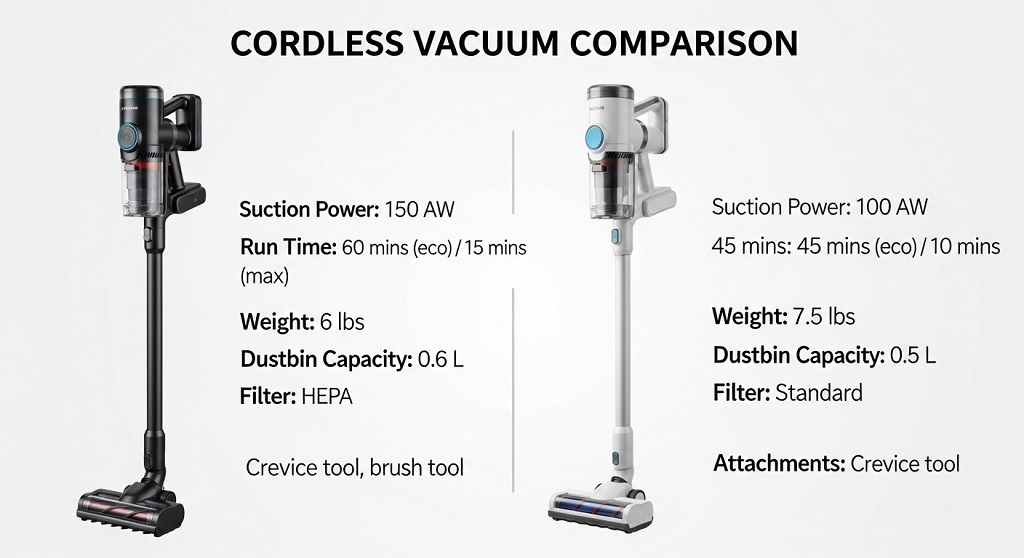
Answer: Compare motorized brush rolls and crevice tools. Most buyers use only 2-3 attachments regularly despite packages including 8-12 accessories.
You don’t need 15 attachments.
Manufacturers load battery powered vacuum packages with accessories to justify higher prices. Then those attachments sit in a closet forever.
Compare what you’ll actually use:
Essential attachments (you’ll use these weekly):
- Motorized floor brush with soft roller for hard floors
- Motorized brush for carpet with stiff bristles
- Crevice tool for baseboards and tight spaces
- Upholstery tool for furniture and stairs
Nice-to-have attachments (monthly use):
- Dusting brush for vents and blinds
- Extension wand for ceilings and fans
Marketing fluff (you’ll never use):
- Specialized pet grooming tools
- Mattress cleaning heads
- Flexible hose attachments
- Multi-angle adapters
A 2023 survey of 500 cordless vacuum owners found that 68% use only the main floor brush and crevice tool. Only 12% regularly use more than four attachments.
Compare attachment quality, not quantity. A well-designed motorized brush with LED lights beats five cheap plastic tools.
Check if attachments click-lock or friction-fit. Click-lock stays connected during use. Friction-fit falls off mid-clean and drives you crazy.
Look for wall-mounted storage that holds the vacuum and all attachments. If attachments end up scattered in drawers, you won’t use them.
How Do Dust Bin Sizes Affect Real-World Cleaning?
Answer: Compare bin capacity against your home size. Bins under 0.5 liters require multiple empties for homes over 1,000 square feet.
Small bins kill cleaning momentum.
Lightweight cleaners sacrifice bin size to reduce weight. That means constant trips to the trash can.
Compare capacity to your needs:
- 0.2-0.4 liters: Good for apartments under 800 sq ft or quick daily cleanups
- 0.5-0.7 liters: Handles 1,000-1,500 sq ft homes in one session
- 0.8+ liters: Best for larger homes or pet owners who vacuum frequently
But capacity isn’t everything. Compare these factors:
Empty mechanism: Bottom-drop bins empty cleanly. Side-opening bins require you to dig out compacted dirt with your fingers. Gross.
Filtration type: Bagless bins need regular filter cleaning. Some filters are washable. Others must be replaced every 3-6 months at $15-30 each.
Dirt compression: Some bins compress debris as you vacuum, effectively doubling capacity. Others fill with air pockets and need frequent emptying.
Real example: The Samsung Jet 75 has a 0.8L bin with compression technology. Users report vacuuming 2,000 sq ft homes in one session. The Dyson V8 has a 0.54L bin without compression. Users empty it 2-3 times for the same space.
Pet owners need bigger bins. Dog and cat hair fills bins 40% faster than regular dust and debris.
What Warranty and Repair Costs Should You Compare?
Answer: Compare warranty length, what’s covered, and replacement part costs. A 5-year warranty means nothing if filters cost $40 and motors aren’t covered.
Your cordless vacuum will need repairs.
Batteries degrade. Filters clog. Brush rolls tangle. The question isn’t if you’ll need parts. It’s how much they’ll cost.
Compare warranty coverage:
| Brand | Warranty Length | Battery Coverage | Filter Cost |
|---|---|---|---|
| Dyson | 2 years | Included | $35 |
| Shark | 5 years | 1 year only | $20 |
| Tineco | 2 years | Included | $25 |
| LG | 2 years | Included | $30 |
Battery replacement is the killer expense. Replacement batteries cost $50-120 depending on brand. Some manufacturers don’t sell replacement batteries at all. Your $400 vacuum becomes trash when the battery dies.
Compare these ownership costs over 5 years:
- Replacement filters: $60-150 (2-5 replacements)
- Replacement battery: $50-120 (one replacement likely)
- Brush roll replacement: $20-40 (if you have pets)
- Total: $130-310 in maintenance costs
Some brands make replacement parts deliberately hard to find. Check part availability before buying. Search “[vacuum model] replacement battery” and see if results appear. No results? You’ll be stuck when it breaks.
Customer service quality varies wildly. Read recent reviews specifically about warranty claims and repairs. A great warranty means nothing if the company takes 6 weeks to respond.
How Do You Compare Price vs. Performance Honestly?
Answer: Calculate cost per air watt and cost per year of expected use. The cheapest upfront price often costs more over 3-5 years.
Price tells you nothing about value.
A $200 vacuum that lasts 18 months costs more than a $400 vacuum that lasts 5 years.
Compare total cost of ownership:
Purchase price + (filter replacements × 5) + likely battery replacement = 5-year cost
Example calculations:
Budget option: $180 vacuum + ($20 filters × 5) + $60 battery = $340 total
Mid-range option: $350 vacuum + ($25 filters × 4) + $80 battery = $530 total
Premium option: $600 vacuum + ($35 filters × 3) + $100 battery = $805 total
Now divide by performance. If the budget option delivers 90 AW and the premium delivers 180 AW, the premium actually costs less per unit of cleaning power.
Compare performance per dollar:
- Budget: $340 ÷ 90 AW = $3.78 per air watt
- Mid-range: $530 ÷ 140 AW = $3.79 per air watt
- Premium: $805 ÷ 180 AW = $4.47 per air watt
The mid-range option wins this comparison. Better performance than budget at similar cost-per-performance.
But consider your use case. If you vacuum once a week on hard floors only, the budget option works fine. If you have three dogs and vacuum daily on carpet, the premium option pays for itself in time saved and better results.
Watch for sales cycles. Cordless vacuum prices drop 30-40% during Black Friday, Memorial Day, and when new models launch. A $500 stick vacuum review might convince you to wait three months and buy at $320.
Conclusion: Make Your Cordless Vacuum Decision With Confidence
You now know how to compare cordless vacuums like a pro.
Don’t trust marketing claims. Check watt-hour battery capacity, air watt suction ratings, and actual weight distribution. Test the vacuum in-store if possible. Calculate total ownership costs over five years, not just sticker price.
Most buyers regret their purchase because they compared the wrong specs. They looked at runtime instead of battery capacity. They counted attachments instead of checking suction power. They bought based on brand recognition instead of real performance data.
The perfect battery powered vacuum for your neighbor might be terrible for you. Match specs to your specific needs. Hard floors only? Prioritize weight and battery life. Thick carpet and pets? Prioritize suction power and bin size.
Ready to make a smart purchase? Create a comparison spreadsheet with these specs for your top 3 models. Fill in the real numbers, not marketing fluff. The right choice will become obvious.
Still unsure which model fits your needs? Drop a comment below with your home size, flooring type, and whether you have pets. I’ll point you toward the best options in your price range.
Frequently Asked Questions
How long should a cordless vacuum battery last per charge?
Quality cordless vacuums run 15-40 minutes on high power settings with motorized brush heads active. Low power on hard floors extends this to 40-70 minutes. Ignore “up to 60 minutes” marketing claims unless you plan to vacuum exclusively on eco mode. Check real user reviews for actual runtime data. Battery life decreases 20-30% after two years of regular use regardless of brand.
Are expensive cordless vacuums worth the extra money?
Not always. Premium models ($500+) offer better suction and batteries but the performance gap is shrinking. Mid-range options ($250-400) now deliver 80-90% of premium performance at half the cost. Expensive models make sense if you vacuum daily, have multiple floor types, or need specific features like auto-adjusting suction. For weekly cleaning of apartments or small homes, mid-range performs identically to premium.
What’s the most important spec when comparing stick vacuums?
Suction power measured in air watts determines cleaning effectiveness. A vacuum with strong suction but short battery life outperforms a weak vacuum with long battery life. Aim for 100+ air watts minimum for carpet cleaning. Hard floor cleaning works fine with 80+ air watts. Weight distribution ranks second for daily usability and preventing arm fatigue during extended cleaning sessions.
How do I know if a cordless vacuum works for pet hair?
Look for 120+ air watts of suction, anti-tangle brush rolls, and bins larger than 0.5 liters. Check if the vacuum includes a motorized pet tool for furniture. Read reviews specifically mentioning the pet breed you own—long-haired dog owners need more power than short-haired cat owners. Test the brush roll removal process. You’ll need to clean tangled hair weekly with pets.
Should I buy a cordless vacuum with a removable battery?
Yes if you clean spaces larger than 1,500 square feet or want future-proof options. Removable batteries let you purchase a spare for extended runtime and swap batteries when one degrades. Built-in batteries are fine for small apartments but limit the vacuum’s usable life to 2-3 years. Removable batteries also cost less to replace ($50-80) than repairing built-in battery units ($120-200).
Do I need HEPA filtration in my cordless vacuum?
HEPA filtration matters if you have allergies, asthma, or pets. True HEPA filters capture 99.97% of particles 0.3 microns or larger, including pet dander, dust mites, and pollen. Standard filters capture larger debris but recirculate fine particles back into your air. HEPA adds $20-40 to vacuum cost and requires filter replacement every 6-12 months. Skip it if you have no respiratory sensitivities and vacuum purely for visible dirt removal.
How often do cordless vacuum filters need replacing?
Washable pre-filters need rinsing every 2-4 weeks depending on use. HEPA filters require replacement every 6-12 months even with regular cleaning. Some brands use permanent filters that never need replacement but require thorough washing monthly. Budget $20-40 annually for filter replacements. Clogged filters reduce suction by 30-50% and force the motor to work harder, shortening overall vacuum life. Set phone reminders for filter maintenance.
Related Topics: How to Choose a 3 Bedroom Apartment for Families
What Next: How to Get House Cleaning Jobs Near You (Step-by-Step)